Analyze, for Salesforce orgs
Your Salesforce org, read from its source.
Upload the metadata you already pull and ask in plain language. Get answers cited to the file and line and to Salesforce's own documentation, diagrams you edit, and models you run again with your own numbers. Read-only by design.
- Never connects to your org
- You upload metadata you already pulled. No org credentials, no deploys, no data writes.
- Your metadata, your sandbox
- The workspace is read in a private sandbox for your session, with no internet access.
- Org facts from your own CLI
- When metadata isn't enough, your Claude Code or Codex gathers the facts read-only.
01Twelve jobs
Start from what you want to come away with.
Pick the workspace, then the job: an answer, a diagram, a model or a report. Or ask your own question and let the AI choose.
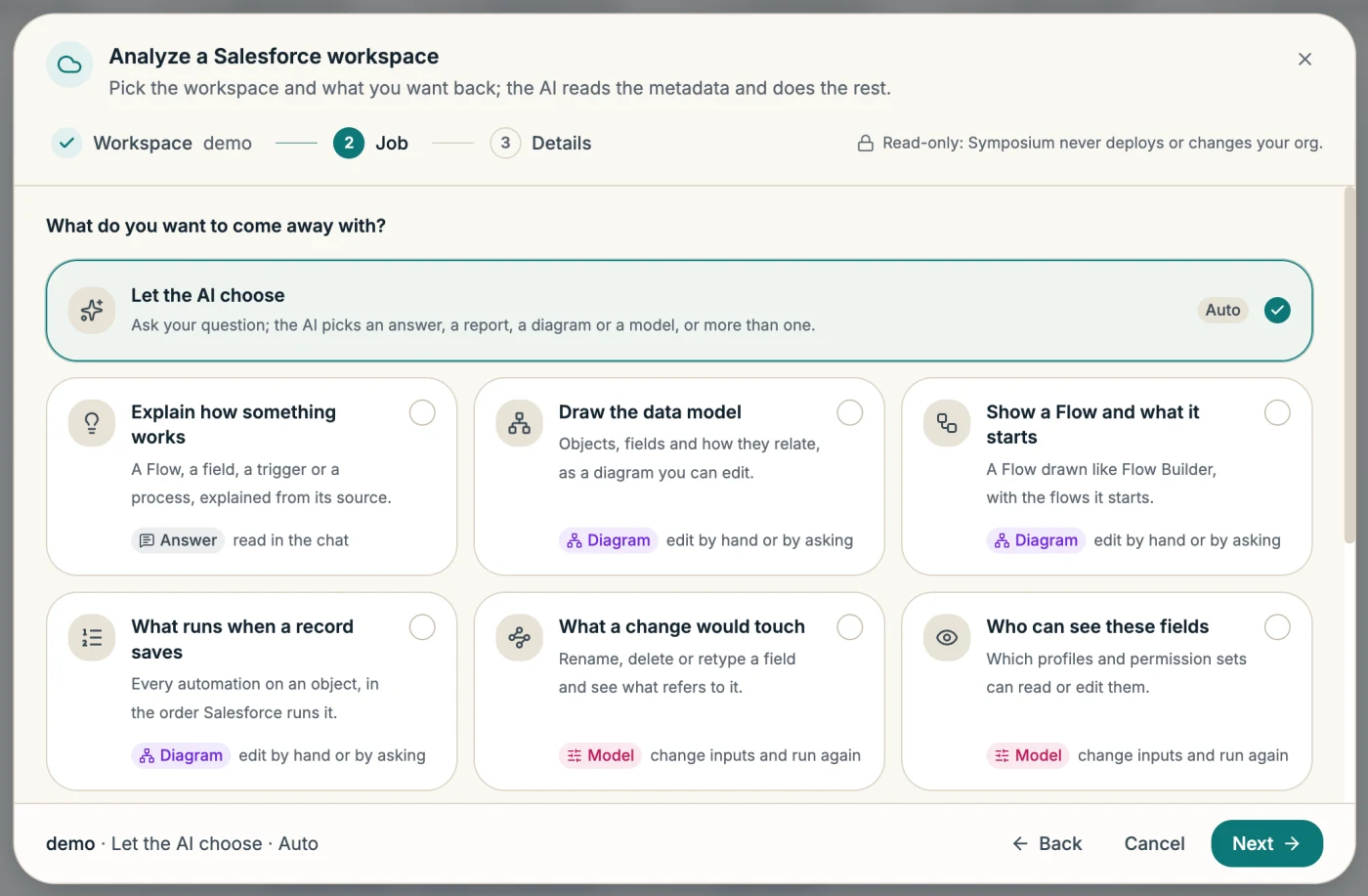
Answer
Read in the chat.
Explain how something works
A Flow, a field, a trigger or a process, explained from its source.
Diagrams
Edit by hand or by asking.
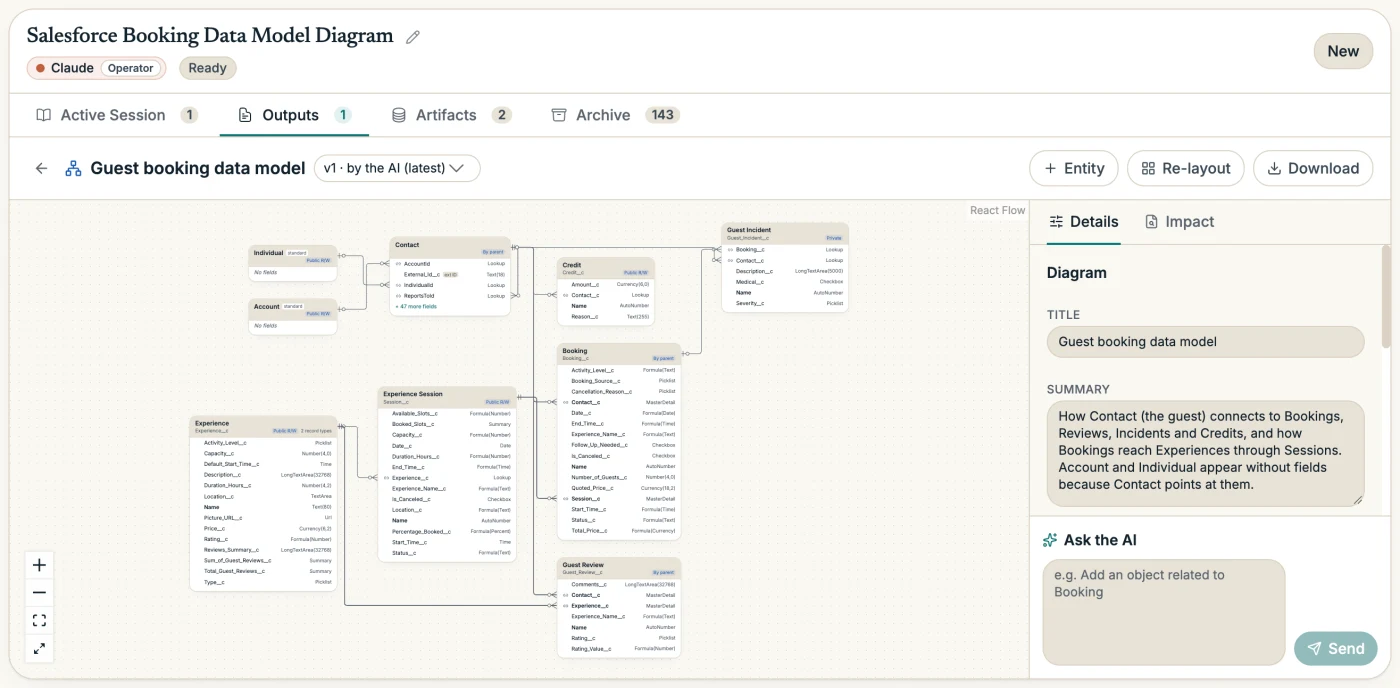
Draw the data model
Objects, fields and how they relate.
Show a Flow and what it starts
A Flow drawn like Flow Builder, with the flows it starts.
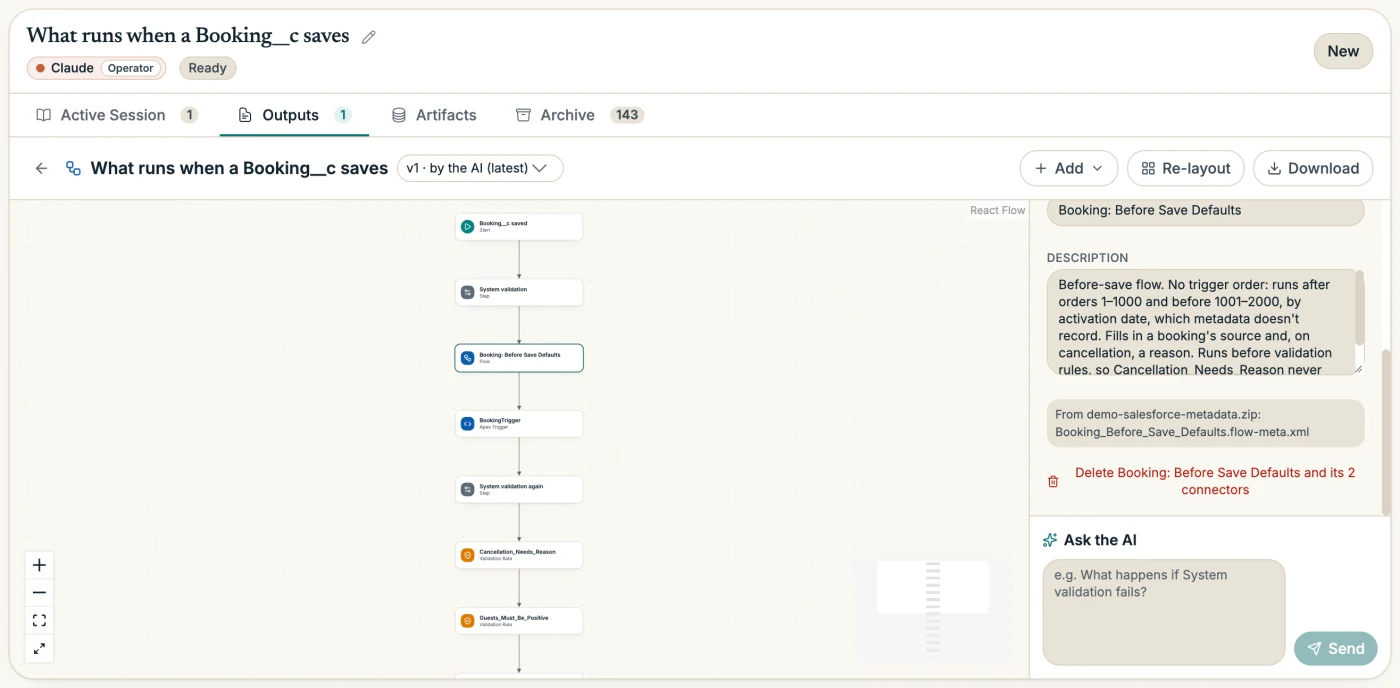
What runs when a record saves
Every automation on an object, in the order Salesforce runs it.
Models
Change the inputs and run them again.
What a change would touch
Rename, delete or retype a field and see what refers to it.
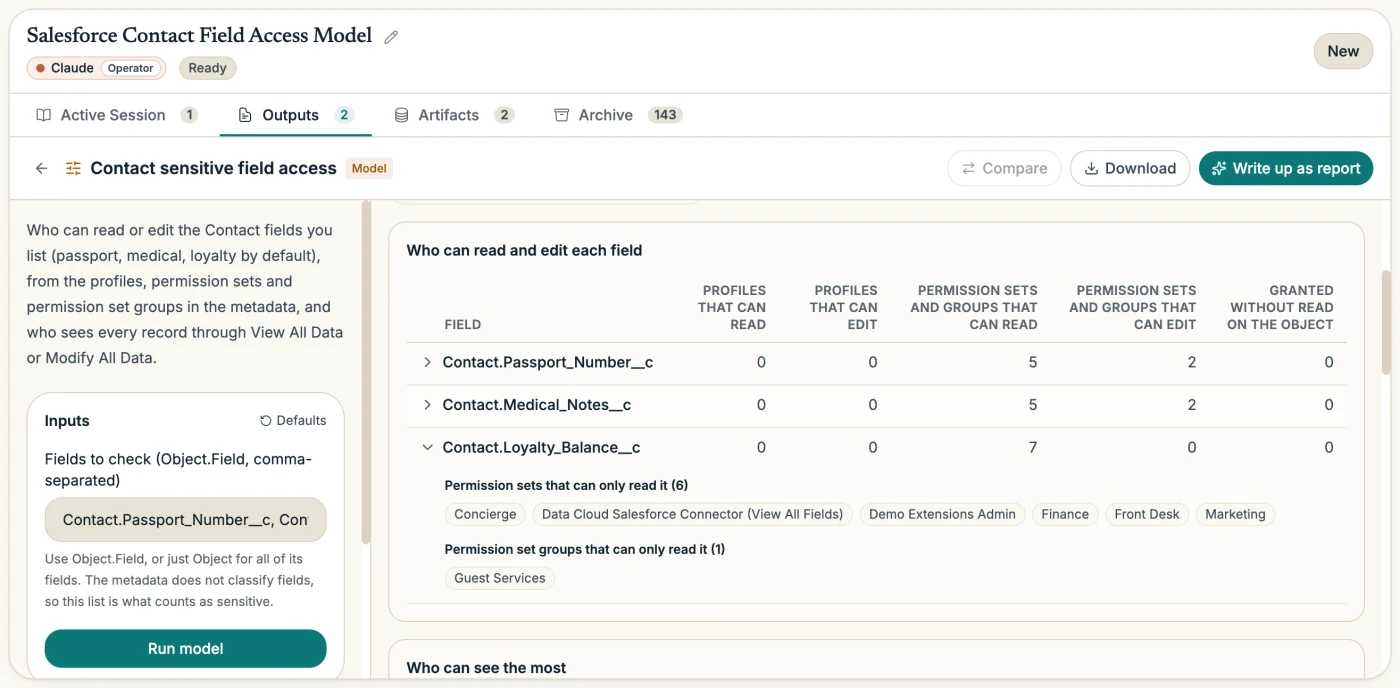
Who can see these fields
Which profiles and permission sets can read or edit them.
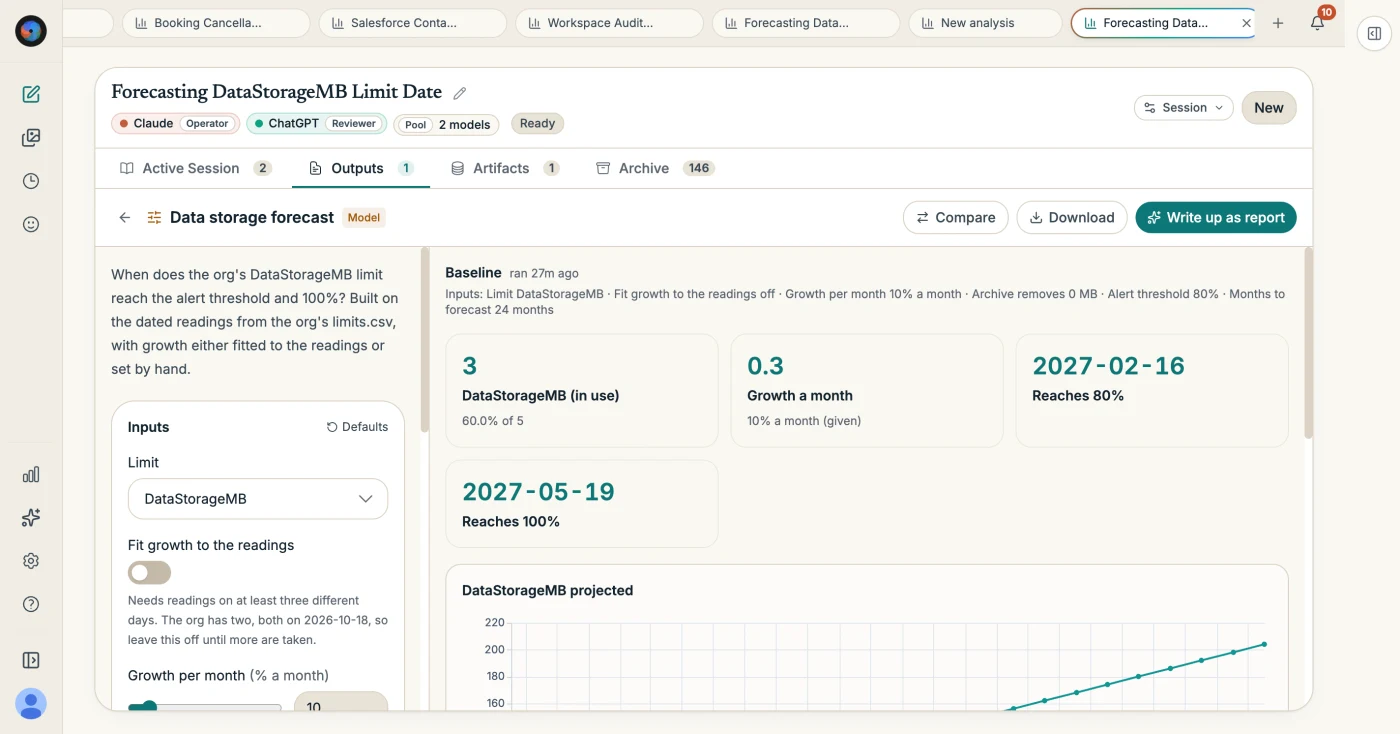
When we'll hit an org limit
Storage, email or API limits forecast from your org's readings.
Reports
Publish as PDF, PowerPoint, Word or an interactive page.
Troubleshoot an error
Paste a Flow error, an Apex exception or a bug report.
Audit the workspace
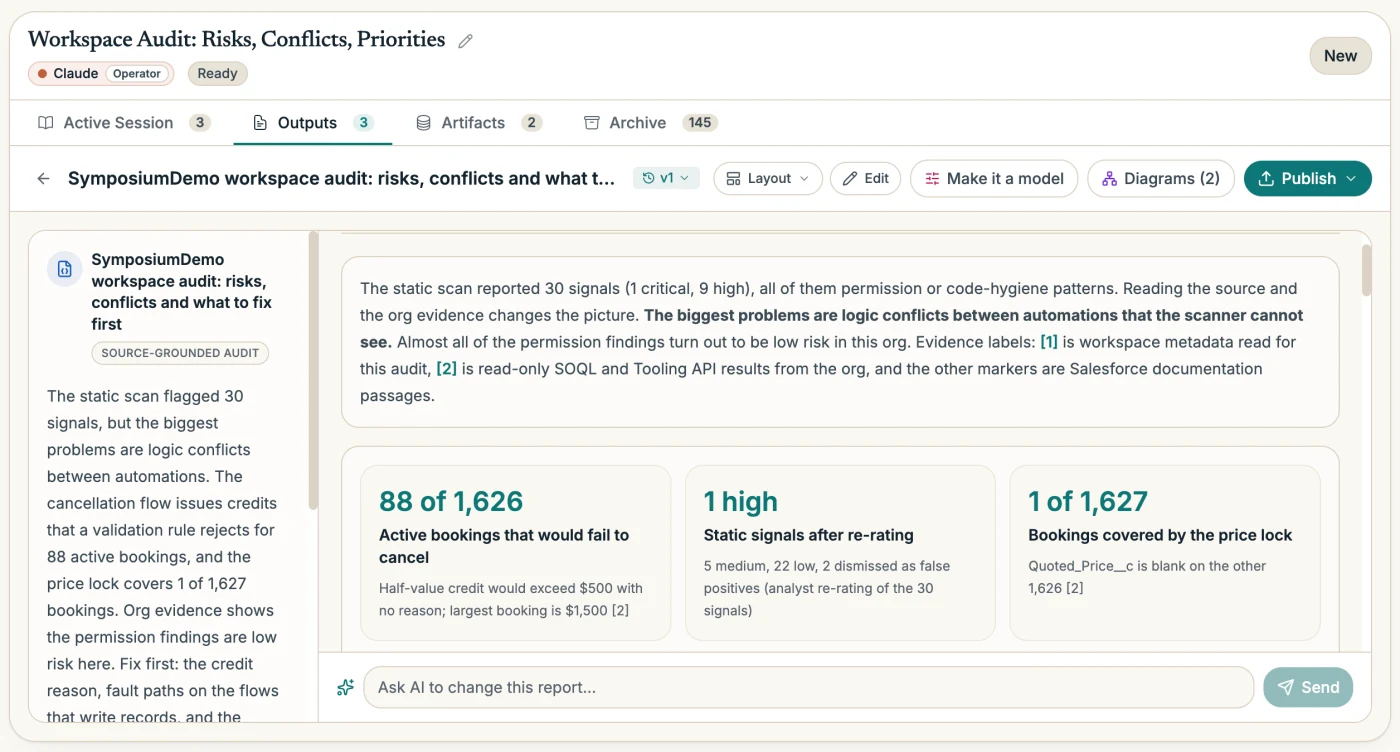
Risks, conflicts and what to fix first.
Review access and governance
Profiles, permission sets, sharing and broad permissions.
Get ready for a release or a feature
What a Salesforce release or a planned feature touches, and a checklist.
Hand off to a developer
Acceptance criteria and implementation prompts, never patches.
02Diagrams
Your org, drawn the way you work on it.
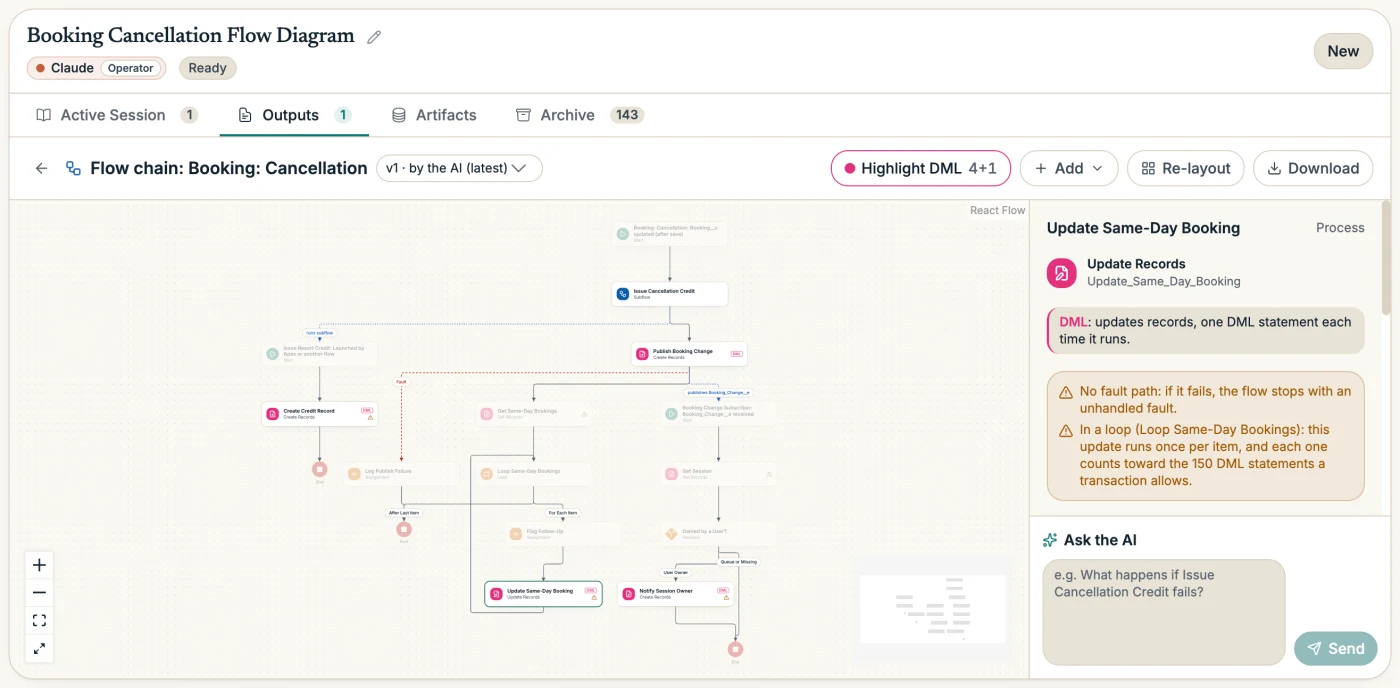
Diagrams come straight from your metadata. Move the boxes, add fields or steps, or ask the AI to make a change. Every save is a version you can go back to.
03Models
Models you run again without the AI.
A model has inputs you change and results that update when you run it. Name a scenario, compare any two, or download the model to run on your own computer.
04Answers you can check
It cites what it read.
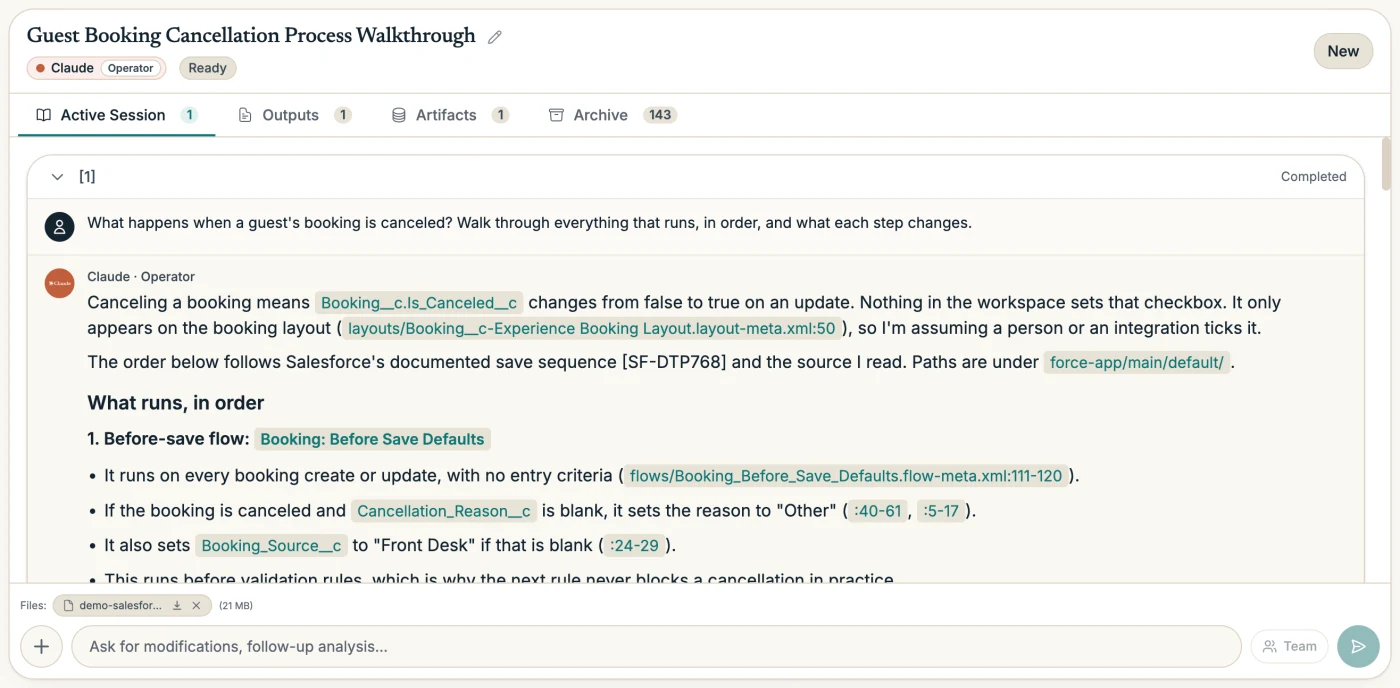
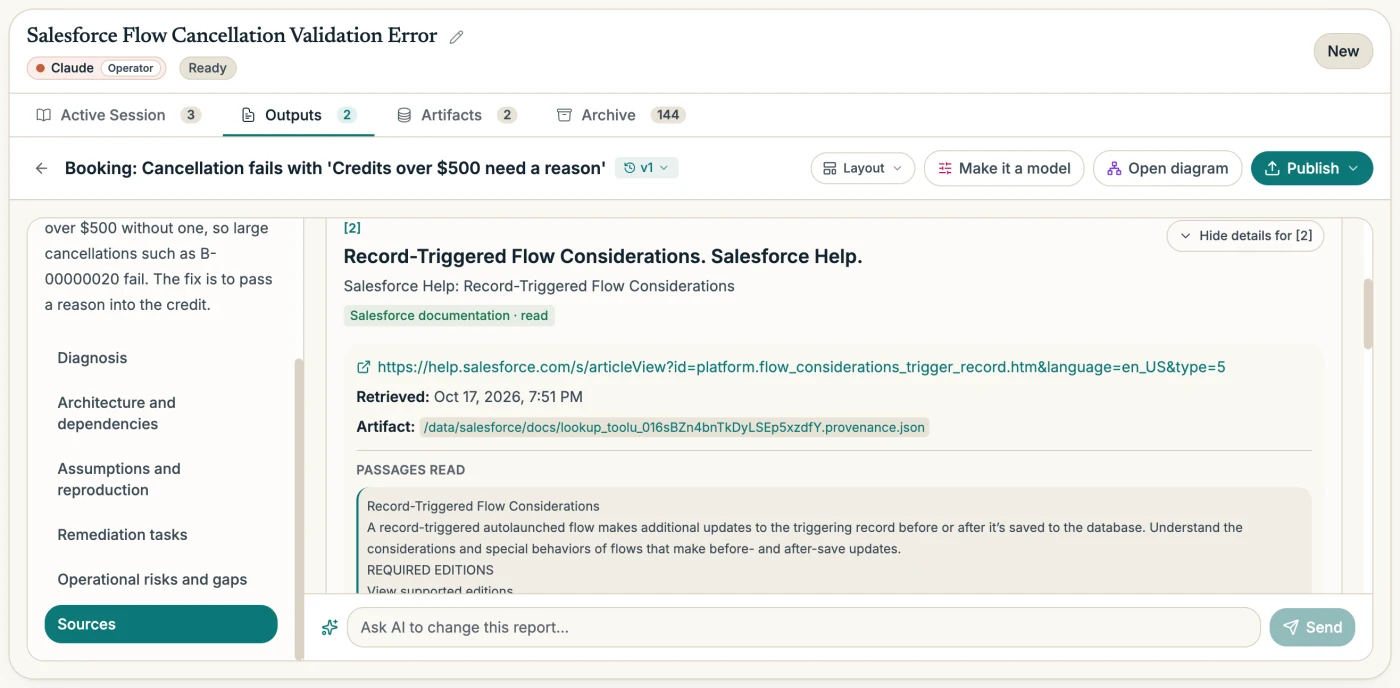
Answers and reports separate what your metadata shows, what the org showed, what the documentation says, and what is still an assumption.
- Source claims cite the file and line
- When the AI says what your org does, it points at the metadata that does it: a Flow element, a line of Apex, a validation rule.
- Platform claims cite the documentation it read
- A limit, what a setting does, the order of execution: each cites a passage the AI received from official Salesforce documentation. If no passage says it, the claim is marked unverified.
- A report can't cite what the AI never read
- A report that presents documentation the AI never received is refused until the AI cites the passage or marks the claim unverified.
- The Reviewer checks each claim
- A second AI checks every Salesforce claim in a report against the passage it cites. Check independently has a different AI redo any point.
05Troubleshoot
Paste the error. Get the cause.
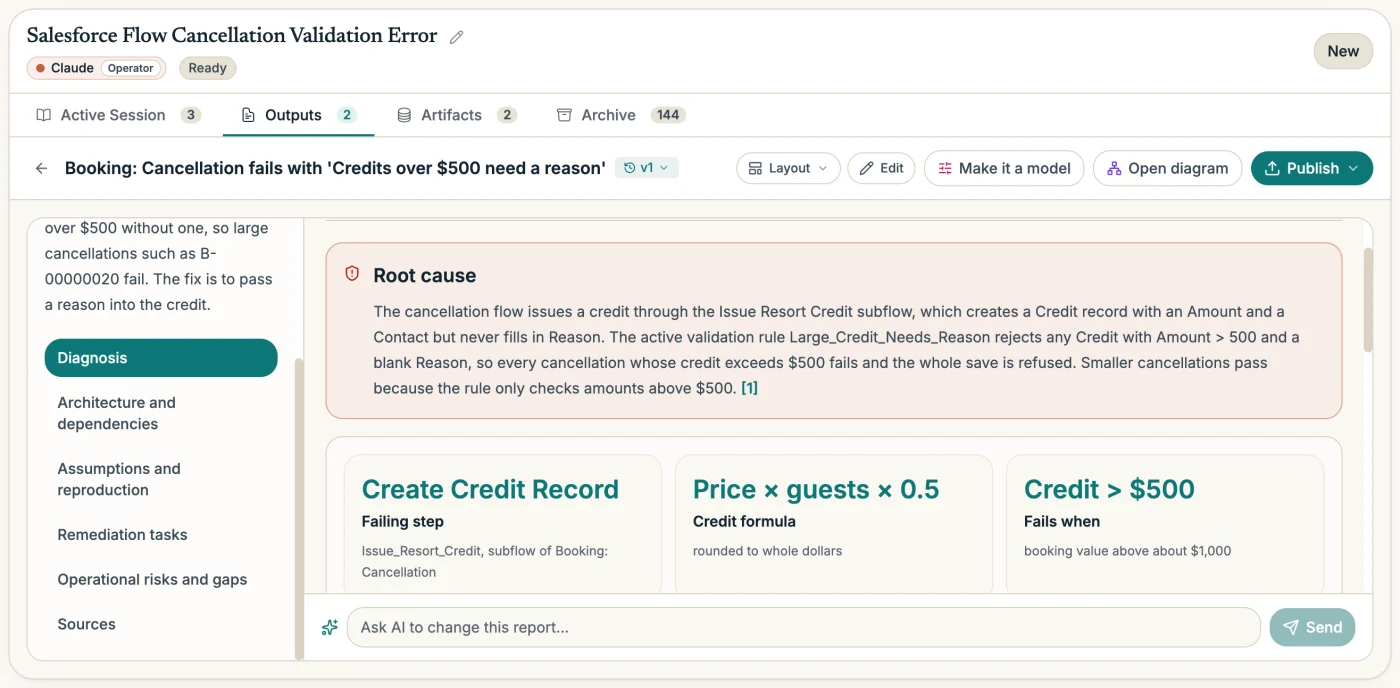
Paste a Flow error, an Apex exception or a bug report. The AI traces it through your metadata to the step that fails and the rule behind it, then writes the fix as tasks, not patches.
06Org evidence
Facts only the org has, from your own CLI.
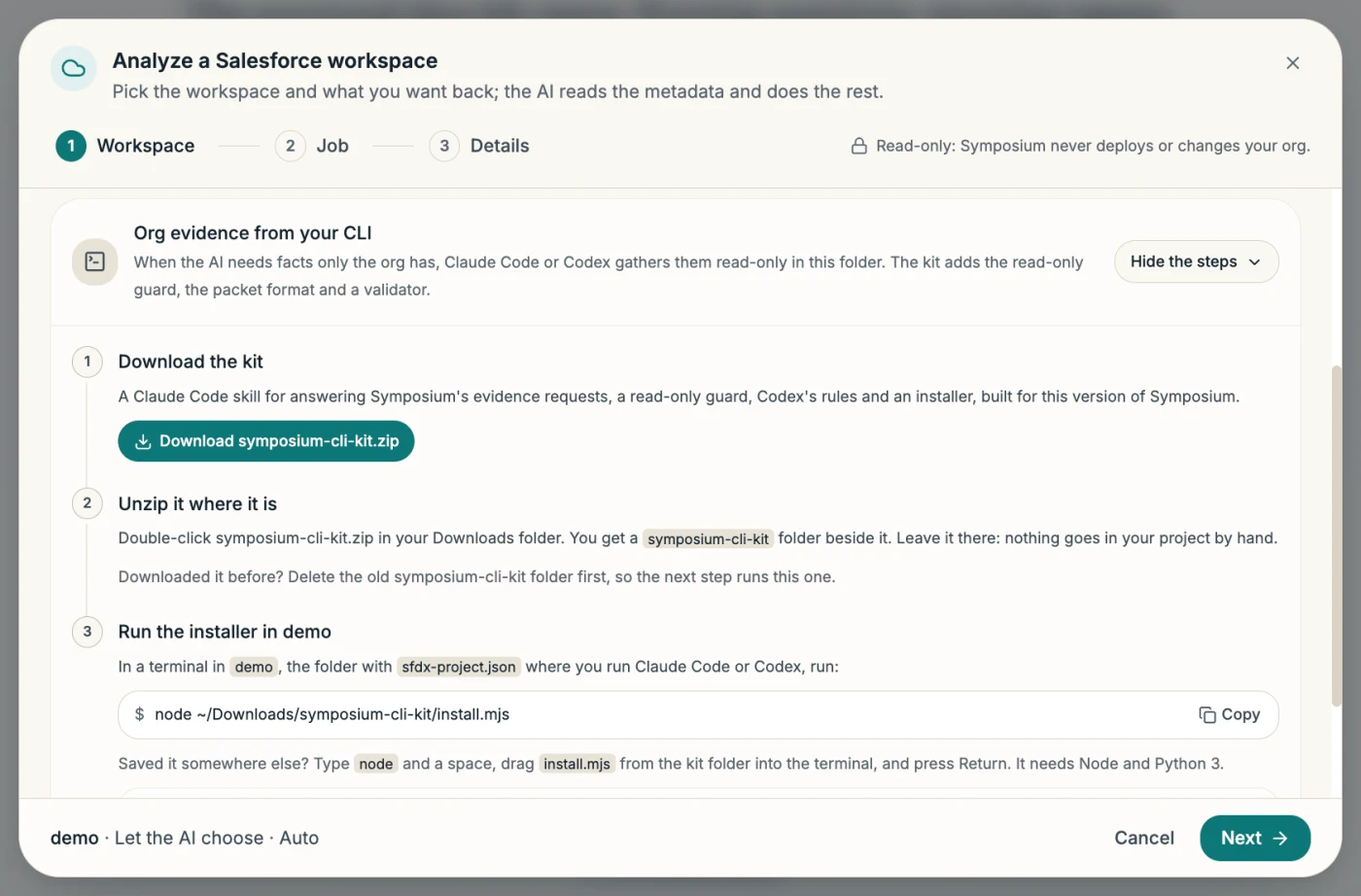
Metadata shows what exists. It doesn't show who holds a permission set, whether a rule is already failing, or how full storage is. For those, the AI asks, and your CLI agent answers.
- 01The AI writes the questions
- When the metadata can't answer something, such as who holds a permission set or whether a rule is already failing, the analysis pauses with a brief: each question, why it matters, and the checks to run.
- 02Your CLI agent runs them
- Copy the brief into Claude Code or Codex in your Salesforce project. The agent runs read-only queries against your org and writes a findings packet into the project folder.
- 03The packet appears by itself
- In Chrome or Edge, with the workspace folder connected, the packet shows up on the request a few seconds after the agent writes it. Elsewhere, import it from the folder. Each packet says which org its queries ran against.
The kit
One download and one command in your Salesforce project. It installs a Claude Code skill that answers Symposium's requests, rules for Codex, a guard that blocks deploys and data changes, and a validator that checks a packet the way Symposium does.
07The whole workspace
All of your metadata, with packages kept apart.
Every metadata type in your package directories, in source or metadata format. Our demo org's 34,610 metadata files upload as a 21 MB bundle.
- Installed packages are inventory, not risk. The audit lists each package with what it contains and counts your own metadata apart, so its findings are about what you can change.
- Python runs over every file, for the questions a built-in audit doesn’t answer.
- Each analysis says which org and which pull it describes.
08Who it's for
Anyone who has to understand an org they didn't build.
- Admins
- Understand an org you inherited, and see who can see what before an access review.
- Architects
- Draw the data model and the automation on an object, and check what a change would reach.
- Developers
- Trace an error to the Flow element or line of Apex behind it, with the documentation that explains why.
- Release managers
- See what a seasonal release or a planned feature touches, with a checklist.
- Consultants and partners
- Get to know a client's org fast, and hand off work as acceptance criteria and prompts.
- Education orgs
- An access inventory for sensitive fields, such as student records: which profiles and permission sets can read or edit each one.
09Your data
What's uploaded, and where it lives.
- The workspace bundle and anything the AI produces run in a private, isolated sandbox for your session, hosted by our code-execution provider E2B, with no internet access.
- Uploads are also kept with the session in our cloud storage, so they are restored if the sandbox is recycled. Sandboxes are deleted after 7 days of inactivity, when you delete the session, or when you delete your account; deleting the session also deletes its uploads.
- Your AI provider keys are stored AES-256 encrypted on our servers and never sent to your browser. Symposium never asks for, or stores, Salesforce credentials.
The details are in the privacy policy.
10FAQ
Salesforce questions.
Does it connect to my org?
No. You upload metadata you already pulled, as a folder or a zip. When an analysis needs facts only the org has, your own Claude Code or Codex gathers them read-only, on your machine. Symposium never holds org credentials.
Which formats does it read?
Source format (a Salesforce DX project with sfdx-project.json) or metadata format (a retrieve with package.xml). It takes every metadata type in your package directories.
Do I need Claude Code?
No. Everything except org evidence works from the uploaded metadata alone. For org evidence, Claude Code and Codex both work, and you can always continue without it.
Can it change my org?
No. Symposium never deploys, writes data, or edits your source. Handoffs are acceptance criteria and implementation prompts, never patches. The CLI kit adds a guard that blocks deploys and data changes, and if your project's CLAUDE.md or AGENTS.md tells agents to deploy, Symposium warns you before you hand anything off.
Which AI providers can run it?
Any provider with function calling: Claude, ChatGPT, Gemini, Grok, Mistral, Cohere, Kimi, or GLM, with your own API keys.
More about Analyze in the FAQs.
Point it at a workspace you already have.
Sign in, add an AI provider key, and choose your Salesforce project folder.
Salesforce, Apex and Flow Builder are trademarks of Salesforce, Inc. Claude Code is made by Anthropic and Codex by OpenAI. Symposium AI is not affiliated with or endorsed by any of them. Screenshots show a demo org built from Salesforce's Coral Cloud sample app.